Perry settled into a corner of the dimly-lit cafe. He worked here every day since he returned from his post-grad tour abroad. He liked to observe the locals as they came and left with their paper cups of coffee throughout the day. There was a nostalgic feel to the space that inspired his content.
An antique payphone decorated the wall directly across from him, and the menu was handwritten on a whiteboard behind the counter. It was a far cry from the fast-paced visual content marketing world that employed him. He opened his laptop and scanned the room while waiting for the WiFi to connect.
A young girl excitedly pinned interview hacks to her Pinterest board two tables away. At the counter, a jogger synced his Fitbit tracker, mapping his run while he waited for his morning smoothie. Behind him, a young mother scrolled through her phone, looking for a coupon while her toddler smudged the glass of the fresh-baked cookie display.
Even in this quaint little shop, patrons were consumed by the need to be digitally connected and visually contented. It may be hard to picture the simple, digital-less age in human history. Not pre-technology — just pre-modern convenience of the NOW, when the only way to shop around for the best product, price, or piece of advice was to go out and look for it.
Remarkably enough, it wasn’t that long ago. In fact, most working-age adults today recall when you had to work much harder to obtain the information you needed to communicate with the world around you and make better-informed decisions. The immediate satisfaction of being able to see and connect with the resources you need at the moment now drives the market — and there’s no turning back.
Here is a look at the growing demand for visual content consumption and how to effectively drive audience engagement visually through your blog posts:
Communication Grows More Challenging as Tech Advances
While it’s easier for consumers to gain immediate access to products and services, today’s communicator faces more challenges than ever before. There is such a vast number of ways to reach your audience.
The process has become more complex as technology has improved and diversified how people consume information. You have to learn more processes and devise strategies to reach your highly tech-oriented audience. And you are up against a much more significant amount of competition in the market than ever before.
Your Audience Determines Visual Demands
Your specific audience determines how you should structure your visual content marketing strategy — and they are browsing the internet right now, looking for your solution.
Since the turn of the last century, Pew Research Center compiled 100 surveys and over 233,000 interviews, concluding that 87% of people in the U.S. use the internet to obtain information to drive their day-to-day decisions. That can range anywhere from practices to purchases to where to go for news.
The good news is that the worldwide web gives marketers a big window to observe industry trends, social media habits, and audience engagement. The first step in creating compelling visuals for your content is to analyze your target audience’s activity and experience level.
The less professional or experienced your audience is, the more visual you should be to make your message clear. The more expert your audience is, the less hand-holding you’ll have to do to relay your message, but the higher their expectations will be in the way you communicate visually.
The ‘Information Overload’ Myth Debunked
The most effective visual content marketing puts the power of persuasion into the hands of the consumer. A study by Pew Research revealed that 77% of internet users like having excess information available. Respondents reported the abundance of information made them feel more in control (79%).
Furthermore, most people today are more confident in their ability to navigate information on the web (81%) and determine what information is the most accurate and valuable to their decision-making process (80%).
With that said, it can be hard to find your jump-off point and create a customized visual content marketing strategy with so many unique ways to reach your audience — and so many more ways to do it wrong.
Let’s Get Technical
any blog or website are a vital tool to drive audience engagement. This is especially important if your product or service cannot be visually promoted. The images and graphics you choose must appropriately elicit the emotional response you intend to impress on your target audience.
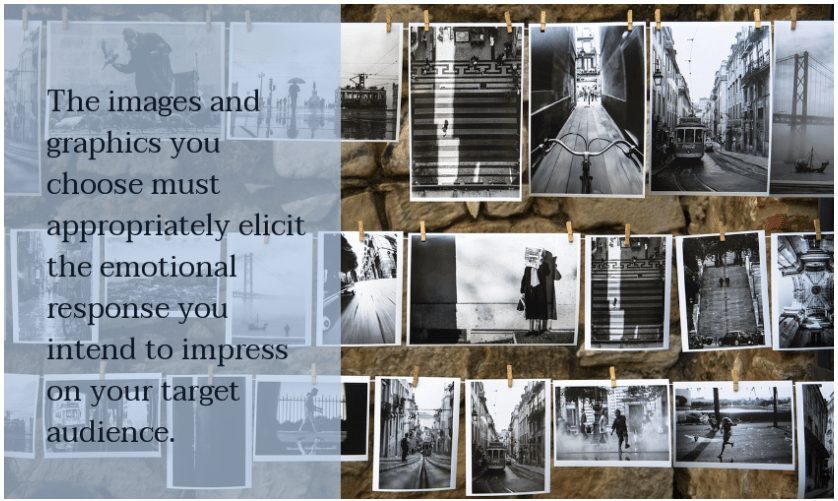
Make sure your visuals are relevant and timely. Choose images of people of the same age and general demographics as the population of people you are trying to engage.
If you’re promoting 401(k) services or finance software, you may want to feature images of retirees. If you have a time management or scheduling app geared toward working mothers, focus on family-oriented graphics. No matter what, though, keep these images positive.
It’s always best to use images of real people performing real-life activities rather than stock images. These visuals are how you make your expertise and services relatable to everyday users and truly show the value you are offering them.
Appeal to their practical sense and enable them to visualize themselves in the situations and scenarios you can simplify for them. This is the only way your solution becomes relevant and necessary.
The impact of visual content marketing should be immediate. Colorful images with sharp contrast are intrinsically more appealing at first glance. And if you have a particularly analytical or technical audience, share actual data that supports your message through visual data analysis. Charts, graphs, and even graphic testimonials are effective ways to use visuals to boost your content credibility and keep your audience engaged.
Visual Content SEO
You may think that SEO has nothing to do with your visual communication strategy; however, the images you use on your blog and how you label them have a huge impact on your site’s search ranking.
A HubSpot survey found that more than half of marketers (66%) intend to grow their organic presence by improving their blog SEO. Your content visibility will suffer if you’re not making this a top priority for your inbound marketing strategy.
The process is simple and is something you can easily update in past blog posts, bringing older content back to life.
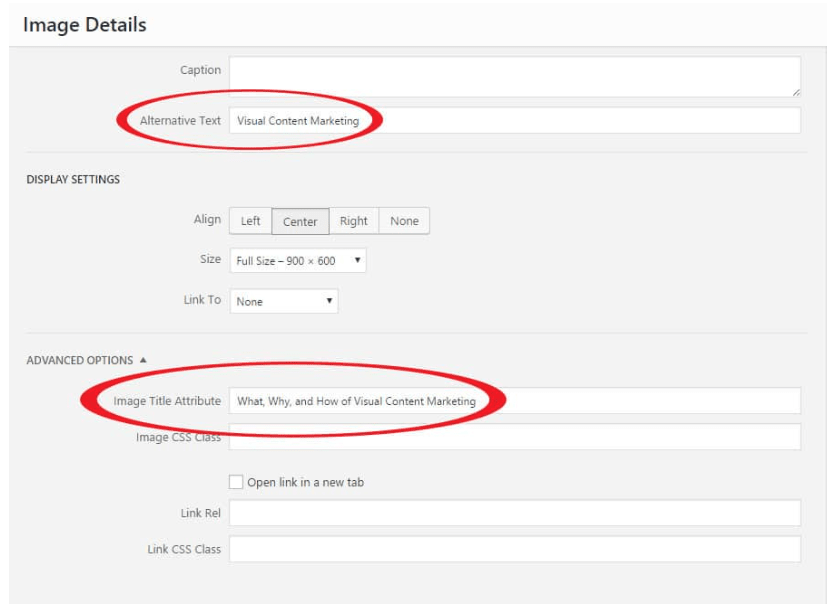
There are three critical and straightforward steps to boost your visual content SEO:
- Name your images descriptively: Keep descriptions concise. If you intend the visual to accompany and accentuate content, you should not become redundant and describe your image as you want the copy interpreted. If appropriately used, the visuals will speak for themselves. Think of these descriptions as a tool to make your content more visible and make your message visually clear.
- Optimize alt tags: You want to use your most relevant and prominent keyword tags to optimize your alt tags when relevant. However, do NOT overload alt tags with keywords or repeat titles in place of using appropriate descriptors or they will be flagged by search engines.
- Clearly cite all sources: Always use your unique graphics or those available in the public domain. There are many resources to find images you can legally alter and post in your content. Even if you obtain the image from one of these sources, it is still vital you cite the source in the image caption. Never use anyone else’s images without permission.
It’s also important not to repeat title keywords from the post or within the images excessively in the description or alt tags. This is a waste of an opportunity to gain more valuable visibility through other relevant keywords. It also can raise red flags in search rankings and adversely impact your overall SEO and SERP scores. Keyword density is invaluable to how your page ranks in Google searches. If you overuse a particular keyword, you could be flagged for it.
The Right File Type and Size
Finally, always make sure you use the right file type and size for the specific kind of content you are sharing on your blog. Consider how your blog images will appear over various connections and devices. Large graphics or low-resolution images will not appear the same on many mobile devices. You don’t want to lose your audience because your visuals prevent them from digesting your content.
Visual content file quick tips:
JPEG
JPEG files will be your safest option for most e-commerce situations. They provide the best quality in the smallest file size and typically respond the best to file compression of photographs. However, they are not a lossless compression file, so GIF and PNG files are recommended for line drawings and text in smaller files sizes.

GIF
While GIFs are fun and more interactive, never use GIFs for large product images or featured images in your content. First, there is no good way to reduce files of this size, and they are not as widely compatible with all multimedia devices.
More importantly, if the GIF file features celebrities, athletes, or other brands, there can be legal ramifications. If you can create your own brand-specific GIFs, it’s best to reserve GIFs for thumbnails and decorative images on your blog. While GIFs are fun and more interactive, never use GIFs for large product images or featured images in your content. First, there is no good way to reduce files of this size, and they are not as widely compatible with all multimedia devices.
More importantly, if the GIF file features celebrities, athletes, or other brands, there can be legal ramifications. If you can create your own brand-specific GIFs, it’s best to reserve GIFs for thumbnails and decorative images on your blog.

PNG
PNGs are a great alternative to JPEGs and GIFs due to their extremely small file size. It is more appropriate for text and line drawing images, as PNG is a lossless compression file. It also offers the ability to add unique transparent images and logos to your blog.
If you can only get product photos in PNG format, try using PNG-8 over PNG-2 PNGs are a great alternative to JPEGs and GIFs due to their extremely small file size. It is more appropriate for text and line drawing images, as PNG is a lossless compression file. It also offers the ability to add unique transparent images and logos to your blog. If you can only get product photos in PNG format, try using PNG-8 over PNG-24.
PNG-8 files support only 256 web color variations, making them an excellent alternative to GIFs with smaller file size. PNG-24 are true color files and are much bigger but can be used as an alternative to JPEGs when lossless compression is desired.

But Wait, There’s More
Discovering what kind of images excite and inspire your target audience and boosting your blog’s visual appeal and SEO is only the beginning of creating an effective visual content marketing strategy. But you must start at the beginning.
Start by looking through your blog images. Be sure your file types and sizes are in order, and you are properly citing your images. And give your readers more of what they love — more visuals.
Then check back here for tips on incorporating visuals through infographics and video, and learn our best practices for sharing your newly revamped content across social media in the next edition of “How To Incorporate Visuals Into Your Content Marketing Strategy.”
 Crystal DeTemple McNeel
You must be logged in to post a comment.